Vercel Labs released fx on August 18: an open-source coding agent that fits in a 6.3MiB binary and cold starts in 10 microseconds. A day later, Guillermo Rauch announced the launch offer: GLM 5.2, free in fx for two weeks, served by BLACKBOX AI. His verdict on the model: "GLM-5.2 is a workhorse." This guide walks through the setup, what fx does well, how to pin BLACKBOX AI as your provider on the AI Gateway, and how to run the same model in eve, Vercel's framework for durable agents.
Set up fx
1. Install the binary
One command installs fx on macOS and Linux:
curl -fsSL fx.sh/setup.sh | bashThe script detects your platform, downloads the 6.3MiB binary to ~/.local/bin, and adds it to your PATH if needed. There is no runtime to install and nothing else to download. fx sits at v0.0.3 and Vercel labels it experimental, so expect frequent changes. Verify the install:
fx --version
fx doctor
fx doctor reports workspace status, configuration, authentication, and Git integration in one pass.
2. Authenticate
Two paths. fx login opens the Vercel authorization flow in your browser and saves the OAuth session to ~/.fx/auth.json, refreshing it automatically. If you prefer a key, run fx setup and paste a Vercel AI Gateway API key; fx stores it in the macOS Keychain, or in ~/.fx/api-key on Linux with user-only permissions. In CI, keep the key in your secret manager and expose it as AI_GATEWAY_API_KEY only to the job that runs fx.
3. Pick GLM 5.2
Run fx inside a repository, type /models, and select glm-5.2. The free window opened on August 19 and runs for two weeks, so the model costs nothing while you put it through real work. A few commands worth knowing on day one: /permissions switches permission modes, /image ./path.png attaches a screenshot, fx resume last reopens your latest session, and $ searches skills you can add with /install_skill.
What fx does well
The CLI behaves like a Unix shell, not an IDE in a terminal: it preserves scroll history, keeps output minimal, and rarely reaches for TUI rendering. fx ask --json returns structured output for programmatic use, fx acp connects it to editors, and a WebAssembly build runs the whole agent in a browser tab at fx.sh/try. Rauch uses it as his daily driver and notes it is 10 to 20 times smaller than the major coding CLIs.
Minimalism runs through the whole harness. The system prompt and tool set stay small to keep context usage and time to first token low, and the core extends through skills, plugins, and MCP rather than built-in features. fx is model and provider agnostic, works with local or cloud inference, and ships with no product telemetry: sessions stay local, and nothing leaves your machine except the inference call itself.
Why GLM 5.2
GLM 5.2 is Z.AI's coding model, released June 16, 2026. It pairs a 1M-token context window with 128K max output tokens, and it holds up on long-horizon tasks: multi-step refactors, large-repo navigation, tool-heavy agent loops. That profile matches fx. The harness keeps its own prompt and tools lean, and GLM 5.2 supplies the context headroom and tool use that agentic coding sessions burn through.
BLACKBOX AI serves GLM 5.2 on its own inference infrastructure at $0.80 per 1M input tokens, $2.55 per 1M output tokens, and $0.16 per 1M cached input tokens. Implicit caching matters here: an agent loop resends much of the same repo context every turn, and cache reads cut that recurring cost to a fifth of the input price.
Pin BLACKBOX AI as the provider
fx routes inference through Vercel's AI Gateway, and the gateway makes its own routing decisions. Call the unpinned model id zai/glm-5.2 and the gateway monitors provider health and fails over to another host when the primary degrades or slows down. If you want the serving infrastructure that carries the fx launch traffic on every request, pin it.
When you call the gateway from your own code with the AI SDK, two options control routing. only is a hard pin: the gateway sends every request to BLACKBOX AI, and when the provider cannot serve a request it returns a no_providers_available error instead of silently rerouting to another host. order is a preference: requests try BLACKBOX AI first and fall back to other providers only when it is unreachable.
{
  "providerOptions": {
    "gateway": {
      "only": ["blackbox"]
    }
  }
}{
"providerOptions": {
"gateway": {
"order": ["blackbox"]
}
}
}You can also hard-pin in the model id itself: blackbox/zai/glm-5.2 names the provider inline and behaves like only. Pick the strict form when you need one provider for compliance or benchmarking, and the order form when you want Blackbox first with the gateway's failover kept as insurance.
Move from fx to eve
fx is for interactive work in your terminal. eve turns that work into a backend agent that can continue without an open shell. It is an open-source, filesystem-first framework from Vercel. The framework is in preview, so its APIs and behavior can change.
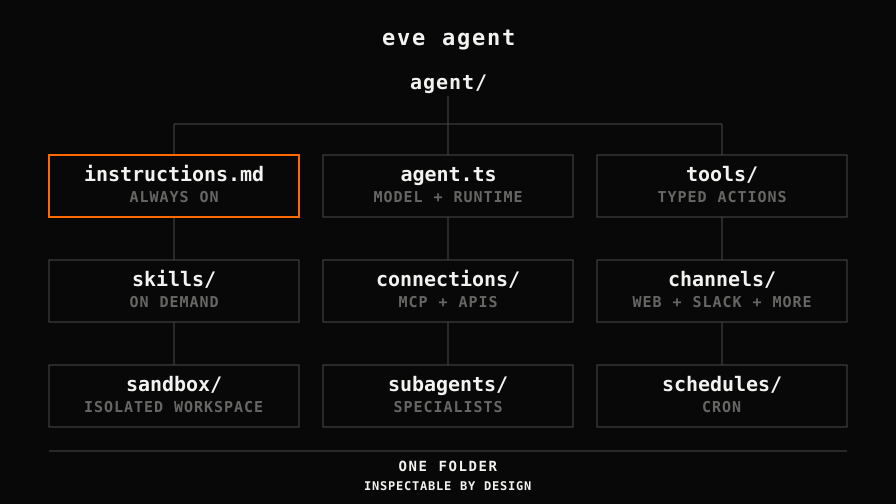
An eve agent starts as one folder. instructions.md defines its role. agent.ts selects the model and runtime settings. Add typed actions in tools/ and focused playbooks in skills/. Connections, channels, sandbox rules, subagents, and schedules also live in clear folders. The result is easy to inspect in code review and easy to extend as the agent grows.
Start with GLM 5.2
Create the project with Node.js 24 or newer. The scaffold installs its dependencies, initializes Git, and starts the local terminal interface:
npx eve@latest init my-agentGLM 5.2 is eve's default model, so a new agent already uses zai/glm-5.2. For local model access, set AI_GATEWAY_API_KEY. A linked Vercel project can use VERCEL_OIDC_TOKEN instead. These are eve credentials. The local login that fx stores is not part of this setup.
You can leave agent.ts out when you accept eve's defaults. Add it when you want the model and provider route to be explicit. This example keeps GLM 5.2 and hard-pins BLACKBOX AI in the Gateway:
import { defineAgent } from "eve";

export default defineAgent({
  model: "zai/glm-5.2",
  modelOptions: {
    providerOptions: {
      gateway: {
        only: ["blackbox"],
      },
    },
  },
});
The hard pin has the same tradeoff as the earlier AI SDK example. Every model call goes to BLACKBOX AI. If Blackbox is unavailable, the Gateway returns an error. It does not try another provider.
What durable means
eve organizes execution into sessions, turns, and steps. A session is the full conversation. A turn starts with one message. Each model call and its tool calls form a step. eve checkpoints the run at every step boundary with the open-source Workflow SDK.
If a process crashes or a deployment changes, eve resumes from the last completed step. Completed steps do not run again. An interrupted step can run again, so tools that send email, charge money, or change data still need idempotency.
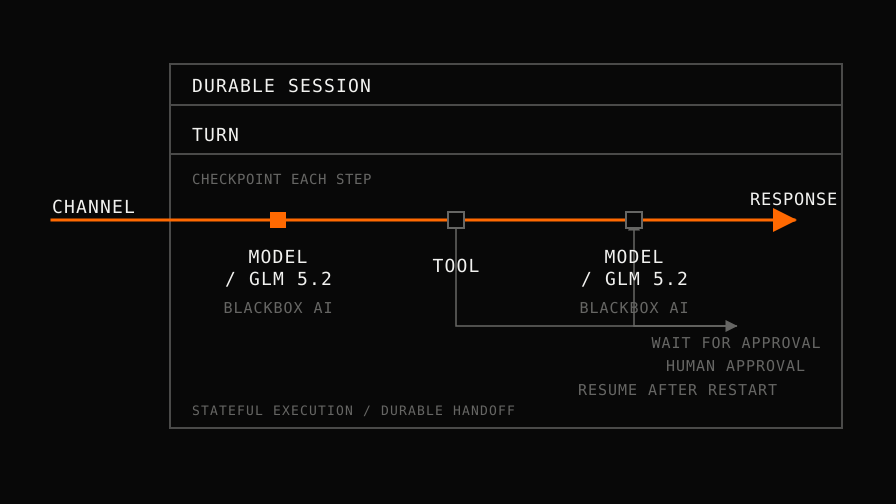
Approval gates use the same durable path. A tool can pause before a sensitive action, ask a person, and resume at that step after approval. The agent does not need to keep a process open while it waits.
Give the agent a safe place to work
Every eve agent has one isolated sandbox with a /workspace filesystem. Shell and file tools run there. Model keys, tool secrets, and connection credentials stay in the trusted app runtime. You can also restrict sandbox network access with a policy.
Put it where work arrives
Channels connect the same agent to HTTP, a web app, MCP, Slack, Discord, Teams, Telegram, Twilio, GitHub, and Linear. Schedules can start work on a cron expression. In a Next.js app, withEve() mounts the agent routes and useEveAgent() handles sessions and streaming on the same origin.
That creates a practical path from prototype to service. Test the workflow with GLM 5.2 in fx. Move the durable role into instructions.md, add tools and safeguards, then run it through eve with BLACKBOX AI pinned as the provider.
After the two weeks
The promo locks you into nothing. GLM 5.2 stays in the BLACKBOX AI model catalog, and we run it for Enterprise customers on the same serving infrastructure that carried the fx launch traffic, behind an OpenAI-compatible API with implicit caching. If the free window sold you on the model, talk to us about an Enterprise setup and keep running it with us.
Resources
eve.dev: eve framework docs and quickstart.
eve on GitHub: source, examples, preview terms, and the full project layout.
fx.sh: fx docs, the install script, and the browser demo.
Ready to serve your first token?
Tell us the workload and the controls it has to satisfy. We come back with a deployment plan and a per-token commit.