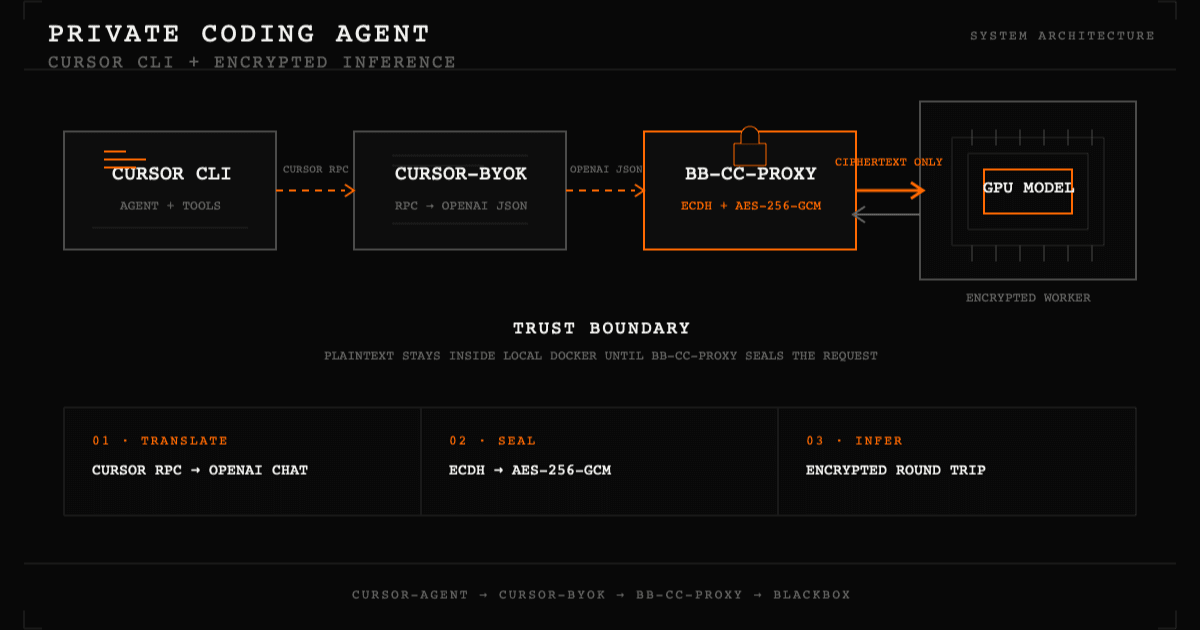
Cursor CLI uses Cursor's native RPC protocol, while the BLACKBOX encrypted-model proxy accepts OpenAI-compatible requests. This guide connects the two without replacing Cursor's coding-agent experience: a headless cursor-byok service translates the protocol, and bb-cc-proxy encrypts model traffic before it leaves your Docker environment.
Why Cursor needs a bridge
OpenClaw already emits OpenAI-shaped requests, so it can talk directly to bb-cc-proxy. Cursor is different: its agent, tool loop, and streaming responses use Cursor's native RPC schema. Pointing Cursor directly at an OpenAI base URL does not solve that protocol mismatch.
The Docker stack assigns one job to each service:
The real BLACKBOX API key is available only to bb-cc-proxy. Cursor authenticates to the container-only bridge with a non-secret local token.
Prerequisites
You need the following on the host:
You also need:
- Your BLACKBOX AI organisation host, in the form https://{your-org}.blackbox.ai.
- A valid BLACKBOX AI API key (sk-...) from the BLACKBOX AI dashboard.
- An encrypted model ID in provider/model form, such as google/gemma-4-31b-it.
No host installation of Cursor, Go, Python, or cursor-byok is required. The Docker build downloads a pinned, checksum-verified Cursor CLI package and builds the two local services.
Step 1 — Clone the orchestrator repo
git clone https://github.com/blackboxai-dev/openclaw-docker-e2e-encrypted.git
cd openclaw-docker-e2e-encrypted
The Cursor stack lives under cursor/ and has its own Compose file. It does not change or share containers with the OpenClaw setup in the same repository.
Step 2 — Configure the encrypted model
Create the shared environment file:
cp .env.example .envEdit .env with your organisation host and key:
ENC_MODEL_URL=https://your-org.blackbox.ai
ENC_MODEL_ID=google/gemma-4-31b-it
BLACKBOX_API_KEY=sk-your-key-here
.env is ignored by Git. The BLACKBOX key is passed only to the bb-cc-proxy container and is not written into the cursor-byok model configuration.
Step 3 — Build the three services
Run the build from the repository root:
docker compose -f cursor/docker-compose.yml --env-file .env buildThis produces three images: the official Cursor CLI runtime, the pinned headless cursor-byok bridge, and the pinned standalone bb-cc-proxy.
Step 4 — Run an encrypted smoke test
docker compose -f cursor/docker-compose.yml --env-file .env run --rm cursor-agent \
  --print --trust "Reply with exactly: hello"
Expected output:
helloIf the command returns a model response, Cursor authentication, native RPC handling, OpenAI translation, encrypted session establishment, and the model round trip all worked.
Step 5 — Use Cursor interactively
Start an interactive coding-agent session:
docker compose -f cursor/docker-compose.yml --env-file .env run --rm cursor-agent --trustThe repository root is mounted at /workspace inside the Cursor container. Cursor can inspect files, search the repository, and use its normal coding tools there. Remove --trust if you want Cursor to show its workspace confirmation prompt.
For a single scripted task, keep --print:
docker compose -f cursor/docker-compose.yml --env-file .env run --rm cursor-agent \
  --print --trust "Read this repository and explain its purpose"
Step 6 — Inspect status and logs
Check the two long-running services:
docker compose -f cursor/docker-compose.yml --env-file .env psWatch protocol translation and encrypted-proxy logs:
docker compose -f cursor/docker-compose.yml --env-file .env logs -f \
  bb-cc-proxy cursor-byok
A successful request includes lines similar to:
ECDH shared key established (session_id=...)
headless service ready backend=0.0.0.0:18090
forwarder provider pass started request_id=...
POST /v1/chat/completions HTTP/1.1 200
The stack checks service readiness once when Cursor starts. It does not continuously poll the services while idle. A 409 session-expired message is recoverable: bb-cc-proxy automatically fetches a new attestation, establishes a new ECDH session, and retries.
Security boundary
Plaintext exists inside your local Docker trust boundary: Cursor, cursor-byok, and bb-cc-proxy must process the request before encryption or after decryption. Traffic from bb-cc-proxy to the BLACKBOX encrypted-model worker is sealed with ECDH-derived AES-256-GCM keys.
The Cursor CLI archive, cursor-byok, and bb-cc-proxy revisions are pinned for reproducibility. Cursor account services such as its managed marketplace and hosted plugin features are not available through the local synthetic authentication. Review Cursor's terms and the third-party cursor-byok source before production use or redistribution.
Troubleshooting
Cleaning up
docker compose -f cursor/docker-compose.yml --env-file .env downThe Cursor and OpenClaw Compose projects are independent. Stopping this stack does not stop or modify OpenClaw.
Ready to serve your first token?
Tell us the workload and the controls it has to satisfy. We come back with a deployment plan and a per-token commit.