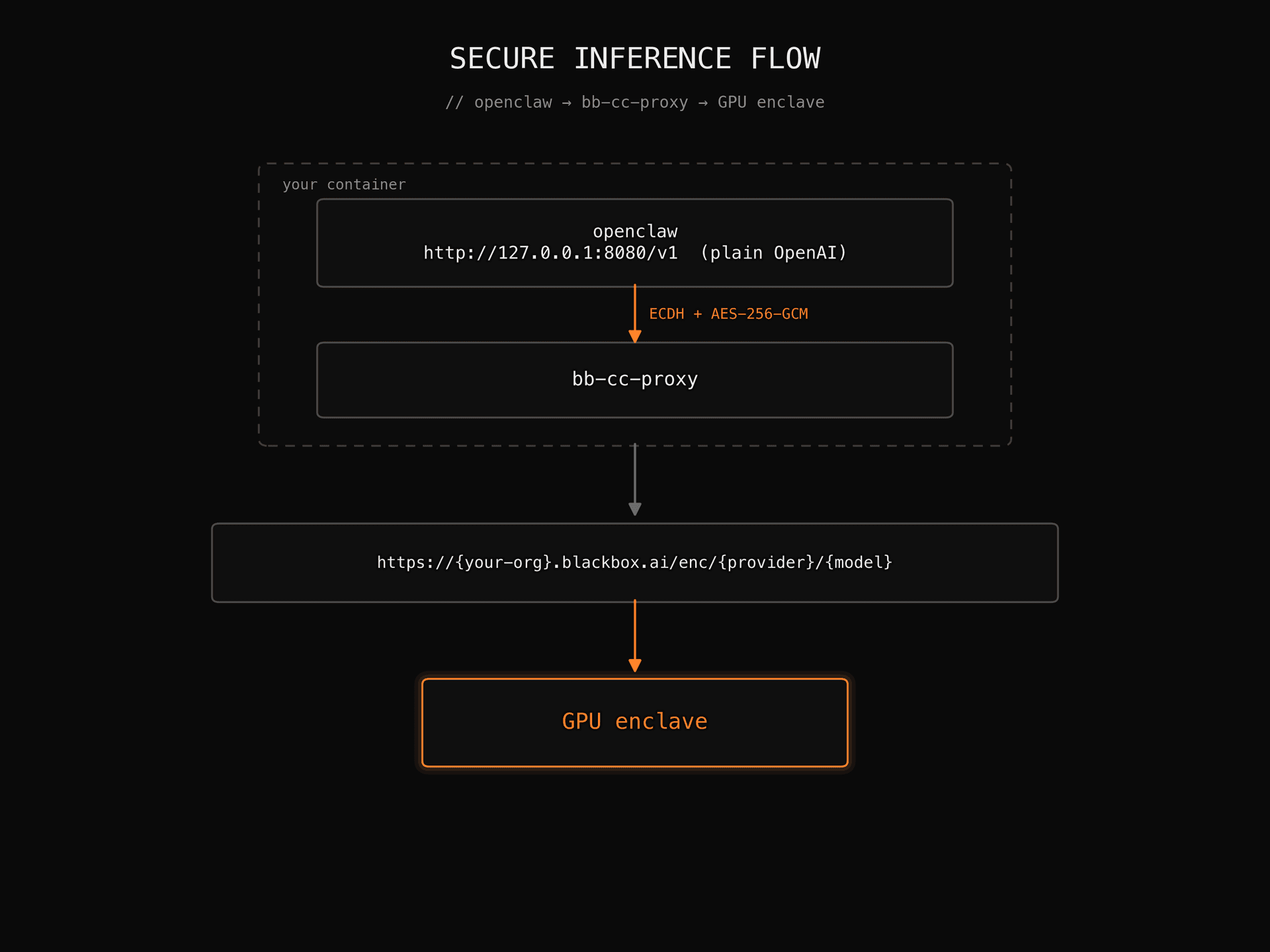
This guide walks you through pointing OpenClaw at a BLACKBOX AI end-to-end encrypted model endpoint from inside a Docker container. All requests are sealed with ECDH + AES-256-GCM before they leave your machine and only decrypted inside the GPU enclave.
Prerequisites
You need the following installed on your host. Links point at the official install pages, we won't repeat them here:
You also need:
- Your BLACKBOX AI organisation host: a URL of the form https://{your-org}.blackbox.ai. Get it from your BLACKBOX AI account administrator.
- Your BLACKBOX AI API key (sk-…). Create one from the BLACKBOX AI dashboard.
- The encrypted model id you want to use, in provider/model form (e.g. google/gemma-4-31b-it).
Step 1: Clone the orchestrator repo
git clone https://github.com/blackboxai-dev/openclaw-docker-e2e-encrypted.git
cd openclaw-docker-e2e-encrypted
The repository ships a Dockerfile, a docker-compose.yml, and a pre-baked OpenClaw config. During the build it clones bb-cc-proxy from its own upstream repo (github.com/blackboxai-dev/bb-cc-proxy). You never need to interact with the proxy repo directly.
Step 2: Configure your environment
Copy the example env file and fill in your values:
cp .env.example .envEdit .env:
ENC_MODEL_URL=https://your-org.blackbox.ai

# REQUIRED: your BLACKBOX AI API key
BLACKBOX_API_KEY=sk-your-key-here

# OPTIONAL: defaults to google/gemma-4-31b-it
# ENC_MODEL_ID=google/gemma-4-31b-it
.env is in .gitignore by default so your key won't be committed.
Step 3: Build the container
docker compose build openclawThis produces one image (openclaw-enc:latest) containing both bb-cc-proxy and the openclaw CLI.
Step 4: Run a smoke test
Verify the whole path (attestation, ECDH handshake, encrypted request, decrypted reply, OpenClaw dispatch) with a single one-shot command:
docker compose run --rm openclaw \
  openclaw agent --local --session-key poc:smoketest \
  --message "In one sentence, what model are you?"
You should see output ending with something like:
[entrypoint] starting bb-cc-proxy
[entrypoint]   upstream : https://your-org.blackbox.ai/enc/google/gemma-4-31b-it
[entrypoint]   local    : http://127.0.0.1:8080/v1
[entrypoint] waiting for proxy /health ... ready.
cc_proxy.session: ECDH shared key established (session_id=...)
[provider-transport-fetch] start provider=bbenc model=google/gemma-4-31b-it
POST /v1/chat/completions HTTP/1.1 200
Hello! I'm Gemma 4 31B IT, running on encrypted BLACKBOX AI infrastructure.
[agent] run <uuid> ended with stopReason=stop
If you see the model reply, the encrypted round-trip works.
Step 5: Interactive chat
For an interactive session, drop into the container's shell:
docker compose run --rm openclawYou now have openclaw available with the proxy running in the background. Try any of:
# TUI chat
openclaw chat

# Single agent turn
openclaw agent --local --session-key work:daily --message "Summarise these logs..."

# Verify OpenClaw sees the proxy
openclaw config validate

# Hit the proxy directly (useful for debugging)
curl -s http://127.0.0.1:8080/v1/chat/completions \
  -H 'Content-Type: application/json' \
  -H "Authorization: Bearer $BLACKBOX_API_KEY" \
  -d '{"model":"'"$ENC_MODEL_ID"'","messages":[{"role":"user","content":"hi"}]}'
Type exit to leave the container. Your OpenClaw workspace (pairing tokens, session history, skills) persists in a Docker volume named openclaw-workspace, so subsequent runs pick up where you left off.
Step 6: Point another CLI at the proxy (optional)
The proxy is also reachable from your host at http://127.0.0.1:8080 while the container is running (port 8080 is published in docker-compose.yml). Any OpenAI-compatible tool works. Set:
Troubleshooting
Cleaning up
docker compose down -v          # stop the container and remove the workspace volume
docker rmi openclaw-enc:latest  # remove the image
That's it. You now have OpenClaw talking to your encrypted BLACKBOX AI model inside a fully containerised environment.
Ready to serve your first token?
Tell us the workload and the controls it has to satisfy. We come back with a deployment plan and a per-token commit.